Write together, in LaTeX and Typst.
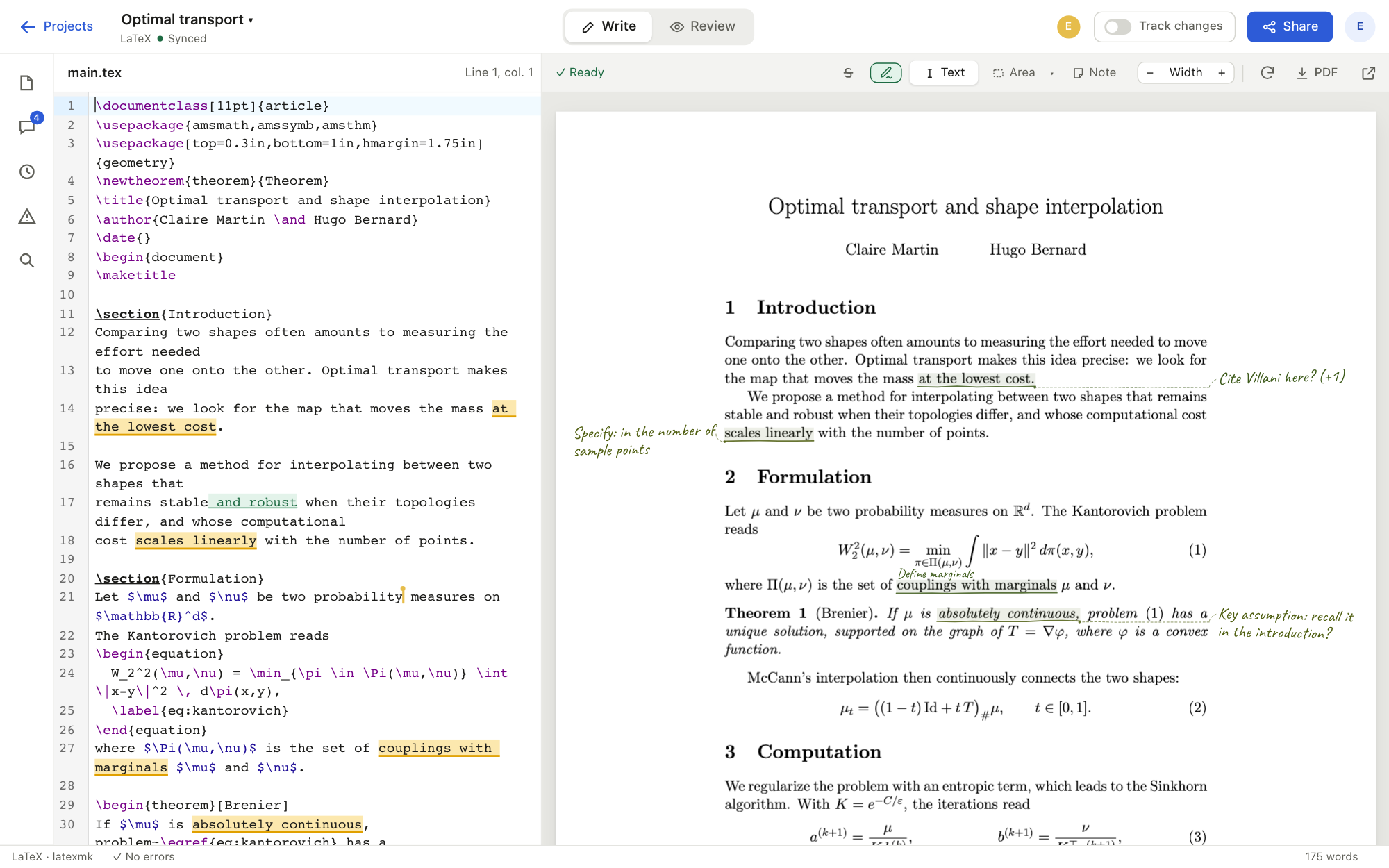
sharedraft is an editor for writing papers, theses and reports together: everyone types at the same time, the preview keeps up, and co-authors mark up the page by hand, just like a printed draft.
Collaborate
Designed for writing and reviewing together
No more emailing versions back and forth or merging by hand: everyone works on the same document at the same time, and every remark stays attached to its passage.
Real-time editing
Several authors in the same file: everyone sees the others' changes as they are typed, with no conflicts to resolve.
Annotate the output
Highlight, circle, draw a brace or write a note in the margin, as on a printed copy. Every mark stays anchored to the source text and follows its edits.
Threaded comments
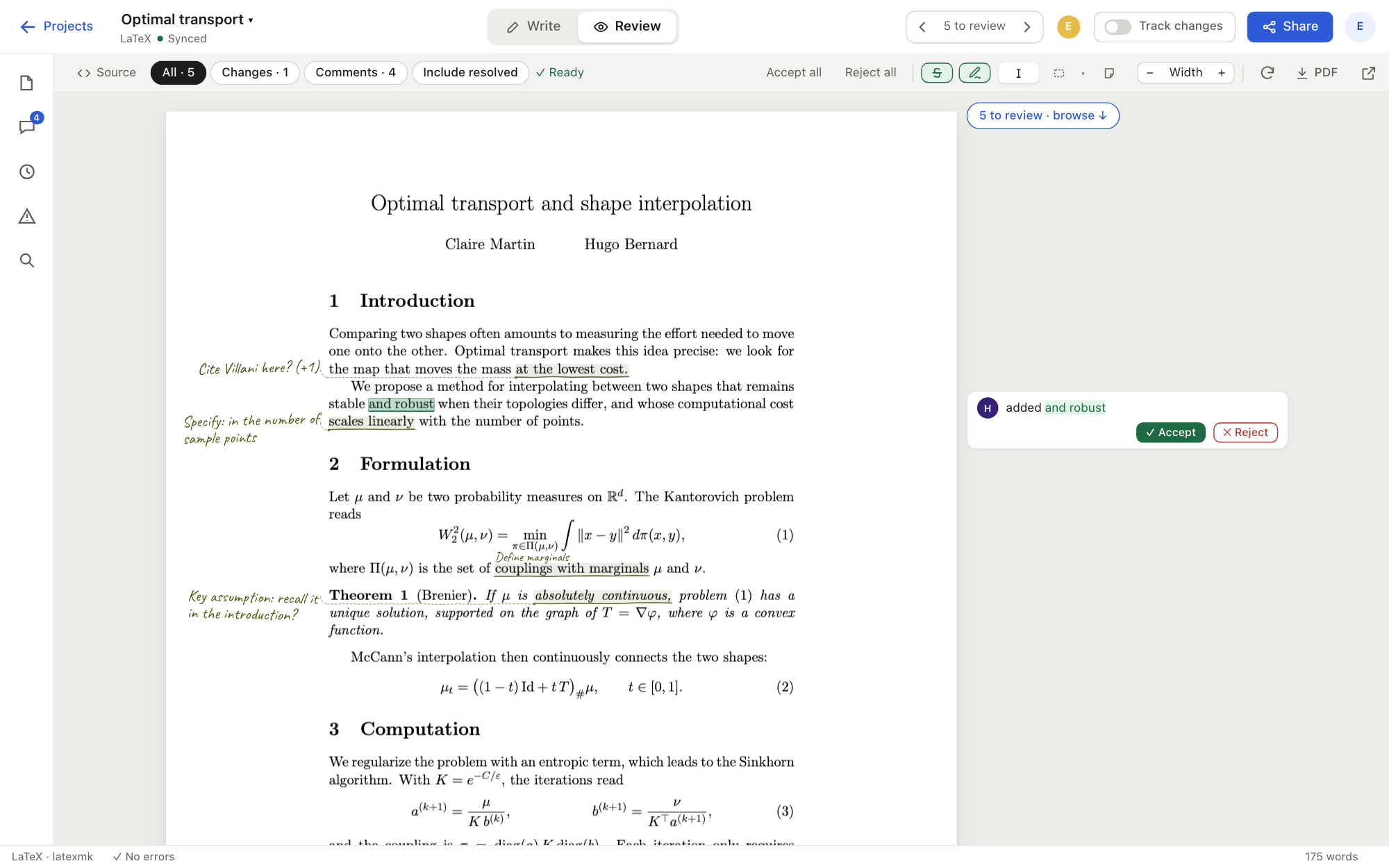
Comment on the source or on the page, reply, mark as resolved. In Review mode, remarks line up in the margin, level with their passage.
Track changes
Insertions underlined, deletions struck through, to accept or reject one at a time; also visible in the preview and in the exported PDF.
Versions and git
Save a version, compare two states (deleted text struck through, additions in color, latexdiff for LaTeX), and sync the project with git.
Per-project sharing
Each project has its own members and roles: owner, editor or reviewer. A reviewer can comment without touching the text.
Review
The marked-up draft, without printing it
- Remarks right where they belongNotes in the margin, lines drawn to the passage, circled areas: the review reads like a marked-up paper copy.
- Always up to dateThe text moves, the annotations follow: they are anchored to the source, not to a position on the page.
- One click to the sourceClicking the preview opens the matching passage in the editor.
LaTeX and Typst
Your documents, as they are
Create a LaTeX or Typst project, or import an existing one: a zip archive (Overleaf exports included) or a git repository. The preview updates as you write, and errors are underlined in the editor.
Full compilation on the server with a TeX Live distribution, bibliography and packages included, isolated for each project.
\section{Introduction}
We show that \(f\) is continuous
\cite{smith2024}. % to check
The modern typesetting language, compiled in milliseconds: every keystroke shows up on the page right away.
= Introduction
We show that $f$ is continuous
@smith2024. // to check
Try it without an account, together
Two demo projects are open to every visitor: a two-page paper with its equations and the annotations of two co-authors. Write, comment, annotate: other visitors see it right away. The project is reset every 20 minutes, so don't put anything personal in it.
Try it online
Experimental hosting, in France
To try sharedraft without installing anything, an instance is open on an experimental basis: create an account with your email address and invite your co-authors.
Hosted in France
The instance runs on a server located in France, at Scaleway. Projects are stored and compiled there, within the European Union.
Private data
Your documents, comments and email addresses are never sold, transferred or distributed, and are used for nothing but the service. No ads, no trackers, no third-party scripts on these pages.
Open source soon
The sharedraft code will be released under a free software license (MIT or Apache 2.0), so that anyone can read it, improve it, or run it on their own server.
sharedraft is not yet considered stable, and this hosting is offered on an experimental basis. The service is provided as is, with no guarantee of availability or of retention of documents stored online. Keep a copy of your projects: PDF export, archive, or sync with your own git repository.